Building a Track
Coaster Rail is the block your track is made of. Place it like any other block and it shapes itself: put two rails next to each other and they connect into a slope, a turn or a roll on their own.
Rails work on the floor, on walls and on the ceiling.
This page is about block rails. There is a second kind of track that makes smooth curves at any angle — see Pro Rails.
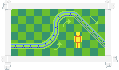
Placing rail by hand
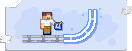
Place a rail
Put down a Coaster Rail wherever the track should start.
Keep going
Place the next one against it. The two connect and bend into the right shape by themselves.
Climb or turn
Place rails higher or off to the side and they become slopes and turns. Walls and ceilings work too.
There is only one Coaster Rail item. Every shape you see is the same block deciding how to look, so you never pick a shape from your inventory. Break a rail and you always get the plain Coaster Rail back.
Rail modes
A rail can push, slow or pull your cars. Interact a rail with the Coaster Wrench and pick a Mode.
Basic
Normal track. Gravity and speed only, no help.
Chain Lift
Pulls cars up at a steady speed. Use it on the first big climb.
Brake
Slows cars down. Use it before the station.
Boost
Speeds cars up in the direction they are already going.
You can change the mode of one rail, or of a whole stretch at once — crouch + interact with the wrench to select an area, then interact again to confirm.
The Track Placer
Building a big loop rail by rail takes a while. The Track Placer stamps a whole ready-made shape in one click.
Pick a shape
Crouch + interact with the Track Placer to open the picker. Shapes are grouped into Turns, Slopes and Other.
Aim at the end of your track
Point at a flat rail at the end of a track. A preview of the shape appears.
Interact to stamp it
The whole shape is built at once, and the Coaster Rails come out of your inventory.
Special rail pieces
Two rails do more than carry cars. Both are wired with a signal key — see Redstone Signals.

Station Rail
Where riders get on. It opens and closes on every signal pulse. It needs a flat rail on both sides.

Switch Rail
A junction. It sends cars left or right, and flips over on every signal pulse.

Messed up a curve? Just break it and place it again. Nothing is wasted — every shape drops back as the same plain Coaster Rail.